InfoDrainage 2027: Key Updates & Workflows
Executive Summary
With the 2027 release of InfoDrainage, importing and merging phases, exchanging pond data with Civil 3D, and network editing workflows have been improved. These new features will improve the management of multiple models, simplify the model consolidation workflow, reduce friction when moving between Civil 3D and InfoDrainage, and reduce manual work when editing networks.
Top 2-3 “Game-Changer” Features
| Feature | What it Does | Impact on our Workflow |
|---|---|---|
| Import and Merge Phases |
Import Phase: import a phase from another .iddx file Import Into Phase (Tech Preview): Merge network data from another phase, in the same or different file, into the selected phase. |
Allows easier management of design iterations and simplifies the process to consolidate multiple models. |
| Civil 3D Ponds interoperability | Ponds from InfoDrainage are represented as the Civil 3D Pond object rather than the previous surface and feature lines. | Smoother import and export between InfoDrainage and Civil 3D, utilizing the latest Civil 3D Drainage Tools. |
| Improved Junction Deletion | If a junction is deleted, the upstream connection is extended to reconnect to the next downstream junction. | Reduces manual work when editing drainage networks. |
Deep Dive: New Capabilities
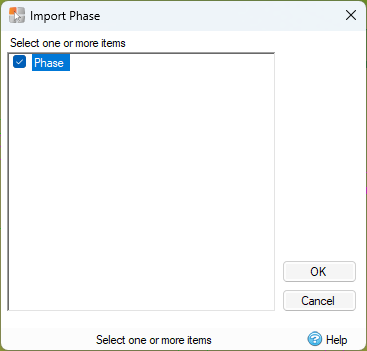
Import Phase: This command allows you to import a phase from another file. You will be asked to select the file, then select one or more phases to import. Each imported phase will be created as a new phase in the current model file.
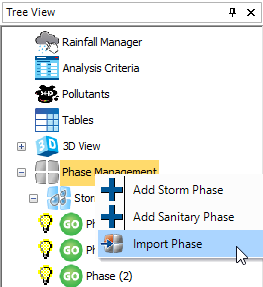
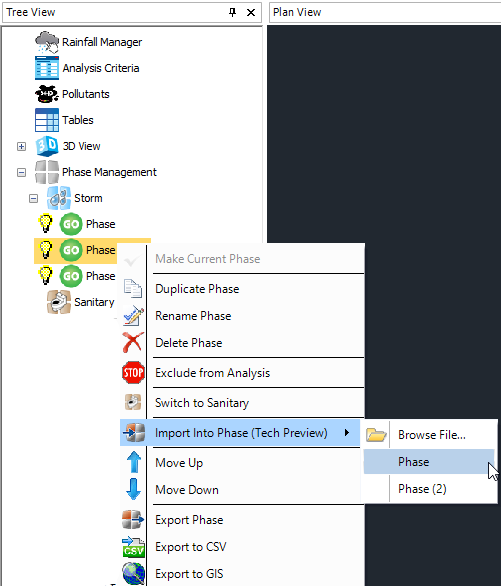
Import Into Phase (Tech Preview): This tool allows you to select a phase to edit, then select a phase to merge into the selected phase. The phase being merged can be in the same file (listed in the menu) or you can select Browse Files to select another model and one or more phases to merge.
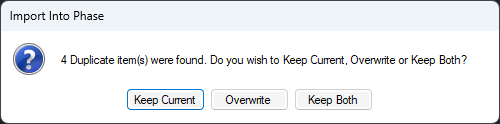
If there are duplicate items between the phases being merged, a form will open, asking if you want to keep the objects in the current phase, overwrite them with the new phase data, or keep both.
Civil 3D Ponds Interoperability:
This improvement to the sharing of data between Civil 3D and InfoDrainage allows Pond objects to be shared between the two programs. From Civil 3D to InfoDrainage, ponds that are connected to the network will be exported and maintain their connection. From InfoDrainage to Civil 3D, ponds are now imported as Pond objects rather than surfaces and feature lines.
Due to the definition of a pond in each software, there are some limitations to how this works. For Surface-Based ponds created in Civil 3D, the geometry cannot be edited in InfoDrainage. Similarly, curved geometry created in Civil 3D may be overridden if edited in InfoDrainage. Additionally, pond outlets may be changed to Free Discharge in Civil 3D if an unsupported outlet type is selected in InfoDrainage. Check the InfoDrainage Help System for the full list of limitations. Autodesk Help
Improved Junction Deletion:
To reduce the manual work of reconnecting connections to junctions when deleting a junction in the middle of a pipe run, a new feature has been added where the remaining pipes will automatically connect to the next junction. This only applies if there is one inlet connection and one outlet connection to the deleted junction.
Known Issues & Compatibility
-
File Versions: The InfoDrainage 2027 iddx file is not backward compatible with previous versions.
-
Plug-ins: InfoDrainage for Civil 3D plugin is available for Civil 3D 2027.
-
Tables: Pasting large amounts of data can cause the software to become unresponsive.
Next Steps & Resources
About The Author

We are the leading provider of civil engineering and survey software solutions and services in Australia.