Civil 3D 2027: Key Updates & Workflows
Executive Summary
Civil 3D 2027 delivers a major update focused on streamlining everyday design tasks, highlighted by the new automated Daylight Feature Line and a handy, AI-driven Autodesk Assistant. The release also brings solid improvements to drainage tools and Horizontal Regression Analysis, making it much easier to lock in accurate alignments from existing survey data. To top it off, under-the-hood upgrades to .NET 10 and the API ensure the platform runs smoother and provides a much better foundation for custom tools.
Top 2-3 “Game-Changer” Features
| Feature | What it does | Impact to our workflow |
|---|---|---|
| Daylight Feature Line | Automates the creation of batter lines based on grading criteria creating an independent feature line. | This automation is designed to help significantly streamline your grading workflows by easily testing multiple solutions without needing to regenerate the grading group each time. |
| Horizontal Regression Analysis | This tool takes existing survey data and accurately fits a design alignment (including your tangents, curves, and spirals) to find the best-fit geometry | Takes away manual guesswork of fitting alignments to get you going quicker. |
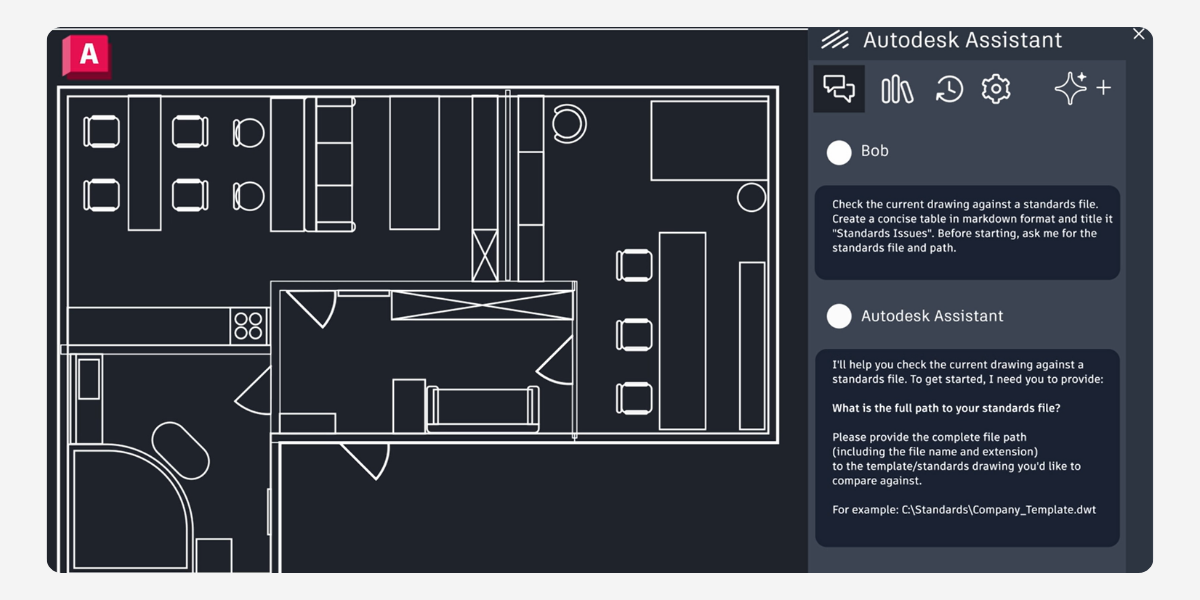
| Autodesk Assistant | It is an AI-powered chat tool built straight into Civil 3D. That lets you use simple text prompts to quickly track down drawing info, check your design standards, and speed up everyday tasks without having to dig through endless menus | It speeds up your workflow by letting you use plain English to instantly query drawing data, automate everyday tasks, and check CAD standards. By taking care of the tedious clicking and searching, it frees you up to crack straight on with the actual design work. |
Deep Dive: New Capabilities
Make Grading Workflows Easier: A First Look at the New Daylight Feature Line
If you spend your days on site design and grading, you know that sorting out batter lines can be a fairly fiddly and time-consuming process. It looks like Autodesk has been listening, because Civil 3D 2027 has rolled out a brilliant new tool to make this exact job a whole lot easier: the Daylight Feature Line. Remember, in Civil 3D Daylight is another way of saying Batter.
Currently available as a Tech Preview that is included in the release, this feature is designed to automatically create batter lines straight from your grading criteria. Here’s a rundown of what this new tool offers and why it might quickly become your new go-to command.
Automated Batter Generation
The main drawcard of this new tool is simple: it automates the hard yakka without taking away your control.
Instead of manually drafting and tweaking your batter lines, Civil 3D 2027 lets you generate them straight away based on your current grading criteria. The best bit? The resulting geometry isn’t locked into a rigid, un-editable grading object. These lines behave exactly like standard feature lines. Once they’re generated, you can jump right in and adjust them using the everyday editing tools you’re already used to.
Total Control with Flexible Options
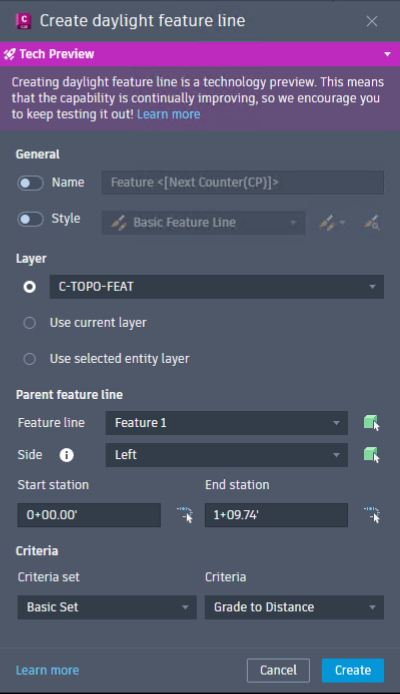
Automation is only handy if you can actually control the end result. The Daylight Feature Line command gives you a solid set of options to make sure everything lines up perfectly with your project standards:
-
Grading Criteria: Pick exactly which criteria you want to base your batter on.
-
Range: Dial in exactly where the battering needs to happen by setting specific start and end chainages (stations).
-
Side: Choose exactly which side of your baseline the new feature line will sit on.
-
Layer Assignment: Drop the new line straight onto your preferred layer to keep your drawing tidy.
-
Name and Style: Set up your custom naming conventions and visual styles right from the command prompt.
If you don’t like the result, edit it or run the command again and use different Criteria. Or better yet, run a few different solutions and assess which solution works best.
Streamlining Your Alignments: A Look at Civil 3D’s Horizontal Regression Analysis
If you are frequently working with survey data on your infrastructure projects, Civil 3D 2027 includes a highly practical tool you should be across: Horizontal Regression Analysis.
The Horizontal Regression Analysis (HRA) is designed to help you optimise your alignment workflows and save time.
What does it do?
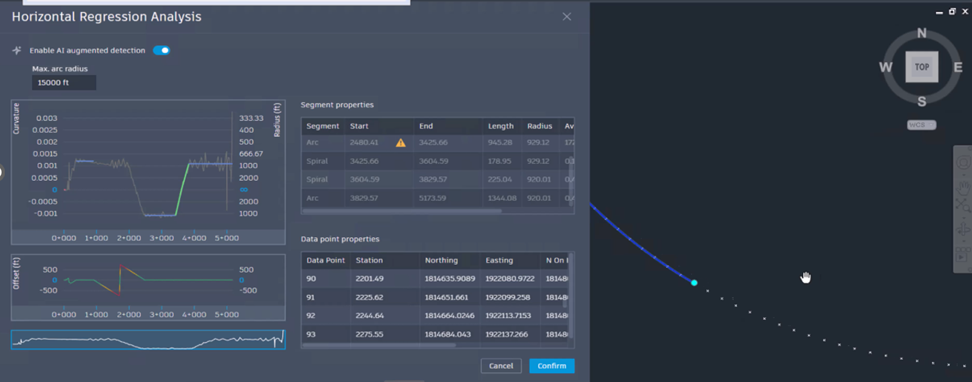
At its core, the HRA tool directly fits a design alignment—including your tangents, curves, and spirals—to your survey information. Rather than spending hours manually sorting out complex geometry, this tool allows you to efficiently generate a best-fit Civil 3D alignment straight from the existing data you already have on hand.
Key Features and Workflow Enhancements
By automating the process of fitting design alignments to existing conditions, HRA drastically reduces manual work. It brings several powerful capabilities to your engineering toolset:
-
Refined, Modeless Interface: You can edit your alignments directly in the drawing environment, creating a fluid and uninterrupted workflow.
-
Real-Time Alignment Preview: The tool allows you to see how your alignment adapts to the survey data on the fly before finalizing the geometry.
-
Machine Learning-Powered Detection: For particularly complex survey data, HRA includes an optional, pre-trained machine learning method that helps generate highly consistent and accurate regression results.
The Bottom Line The Horizontal Regression Analysis tool is all about efficiency. By seamlessly transforming raw survey data into intelligent best-fit alignments, it removes much of the tedious guesswork from the design phase.
Known Issues & Compatibility
-
File Versions: Civil 3D 2027 uses the AutoCAD 2018 drawing format. Drawings saved in Civil 3D 2027 can be opened in earlier versions of Civil 3D.
-
Hardware: Recommended to have 32GB of Memory. Full system requirements for Civil 3D 2027.
Next Steps & Resources
About The Author

We are the leading provider of civil engineering and survey software solutions and services in Australia.